Digital ADHD Productivity Planner: A Practical Tool for Focus and Organization
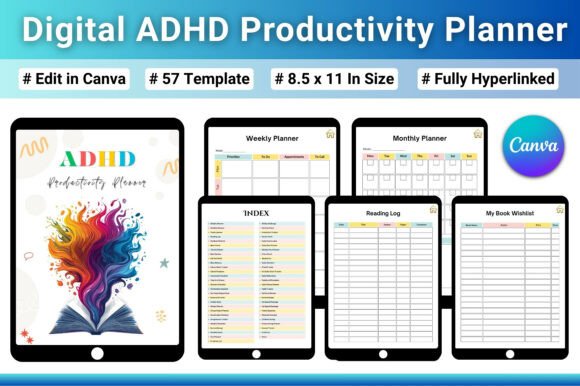
Managing daily tasks, long-term goals, and personal responsibilities can feel overwhelming when your brain processes information differently. The Digital ADHD Productivity Planner offers a structured yet flexible system designed to reduce cognitive load and help you stay consistent. This 57-page all-in-one planner, fully hyperlinked and editable in Canva, brings together school management, life tracking, finance, health, and personal growth tools into one streamlined digital notebook. It aims to simplify planning without adding more complexity — a rare balance in the productivity space.
What makes this planner worth discussing is its intentional design for people with ADHD or anyone who struggles with focus, consistency, and task overload. Rather than forcing a rigid system, it provides clear layouts, easy navigation, and modular sections that adapt to your real-life workflow. Let’s walk through what it offers, how it performs, and who will benefit most from using it.
Purpose and Key Characteristics of the ADHD Productivity Planner
The core idea behind this planner is to eliminate friction. Traditional planners often assume a linear, neurotypical approach to time management — lists, deadlines, and priority matrices that assume you can easily shift between tasks. The Digital ADHD Productivity Planner takes a different path. It uses simple, clean layouts that avoid visual clutter, and its hyperlinked index allows you to jump between sections instantly, reducing the mental effort required to find what you need.
Key characteristics include:
- Hyperlinked Navigation: A clickable index and internal links let you move between trackers, planners, and logs quickly. This is especially helpful on tablets or iPads where scrolling through 57 pages would break your flow.
- School and Study Management: Dedicated pages for homework checklists, assignment planners, group project tracking, examination schedules, weekly timetables, revision checklists, and reading logs. These are structured but not rigid — you can use what fits and skip the rest.
- Goal Setting and Productivity: Goal planners with action steps, monthly and yearly goal setting, weekly priorities, daily checklists, a 30-day challenge tracker, and an energy tracker that helps you align tasks with your natural focus levels.
- ADHD-Friendly Systems: Emphasis on clear, simple layouts without overwhelming options. Habit trackers focus on consistency rather than perfection, and the structure encourages small wins over grand achievements.
- All-in-One Coverage: Beyond school and goals, the planner includes sections for finance tracking, health logging, personal growth reflections, and life management — all within the same file. This reduces the need to juggle multiple apps or notebooks.
Because the file is fully editable in Canva, you can customize colors, fonts, and page order before downloading or using it digitally. This level of flexibility is uncommon in pre-designed planners and adds significant practical value for users who need their system to feel personal and non-restrictive.
Strengths in Real-World Use: Usability, Flexibility, and Effectiveness
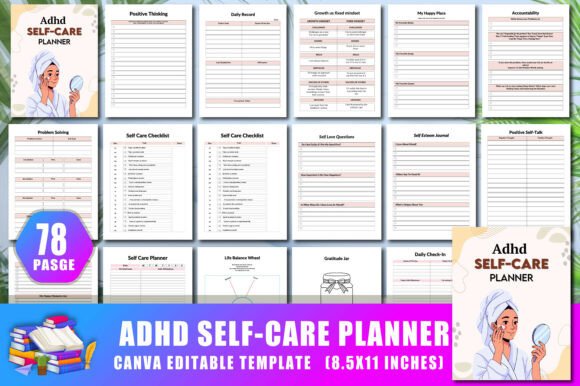
When evaluating any productivity tool, especially one designed for ADHD, the real test is whether it reduces friction or adds to it. The Digital ADHD Productivity Planner performs well in everyday use because it avoids common pitfalls like dense tables, tiny fonts, or confusing hierarchies. Pages like the weekly timetable or homework tracker use generous spacing and clear headings, making them easy to scan quickly — a critical feature when your attention span is short.
The hyperlinked navigation is a standout strength. Instead of swiping through 57 pages to find the finance log or revision checklist, you tap one link on the index page and arrive instantly. This may seem like a small detail, but for someone who loses momentum easily, it makes a real difference. You stay in the task rather than getting lost in navigation.
Flexibility is another major advantage. Because the planner is Canva-editable, you can remove sections you don’t need, rename headings, or adjust the color scheme to match your preferences. This is especially valuable for freelancers, entrepreneurs, and educators who need a system that adapts to their evolving priorities rather than locking them into a fixed template.
Consistency and reliability come from the planner’s modular design. Each section is self-contained, so you can focus on one area without feeling pressure to fill out every page. The habit tracker, for example, uses a simple checkbox format that you can scale from three habits to ten without redesigning the page. This makes long-term use more realistic — you’re not forced into an all-or-nothing commitment.
From a presentation standpoint, the planner looks clean and modern. The layouts use sufficient white space, straightforward typography, and subtle visual cues that guide your eye without shouting. It feels professional enough for serious hobbyists, educators, and small business owners, while also being approachable for students and young professionals.
Effectiveness ultimately depends on how consistently you engage with the system, but the planner lowers the entry barrier. The 30-day challenge tracker and energy tracker are particularly useful for building momentum, as they encourage you to track progress in small, manageable increments rather than demanding perfect daily logs.
Who Benefits Most and in What Situations
The Digital ADHD Productivity Planner is not a one-size-fits-all tool, but it serves a broad range of adults aged 20–50 who struggle with organization, focus, or task management — especially those who have tried conventional planners and found them too rigid or overwhelming.
- Professionals and Entrepreneurs: If you manage multiple projects, deadlines, and responsibilities, the goal-setting and weekly priority pages help you break down large objectives into actionable steps. The finance section also supports basic expense tracking, which is useful for solopreneurs and freelancers.
- Marketers and Creators: Content planning, campaign tracking, and creative project management fit well into the assignment and project planning pages. The flexible layouts allow you to repurpose school-oriented sections for marketing briefs or content calendars.
- Educators and Serious Hobbyists: Teachers, tutors, or anyone engaged in structured learning will appreciate the examination schedule, revision checklist, and reading log. These are detailed enough to be useful without being pedantic.
- Students (College and Graduate): The study management section is comprehensive, covering group projects, weekly timetables, and homework checklists. It’s especially helpful for students who need to balance coursework with part-time work or personal projects.
- Small Business Owners: With sections for goal setting, finance tracking, and personal growth, this planner can serve as a lightweight operations hub for someone who doesn’t need a full-blown ERP but does need to stay on top of priorities and cash flow.
In terms of situations, this planner shines when you need to switch contexts frequently — moving from a creative brainstorm to a financial review to a study session within the same day. The hyperlinked index lets you pivot quickly, and the editable nature means you can adapt the structure as your needs change over weeks or months.
Practical Considerations and Possible Limitations
No tool is perfect, and the Digital ADHD Productivity Planner has a few practical limitations worth noting. First, because it is a digital file designed for Canva editing and tablet use, it requires some initial setup. You need a free or paid Canva account, and you’ll need to export or download your customized version to use it in a note-taking app like GoodNotes, Notability, or PDF viewer. This step is straightforward but may feel like a barrier if you prefer a ready-to-use solution.
Second, the planner’s scope is broad — covering school, life, finance, health, and personal growth. While this reduces fragmentation, users who need deep functionality in one area (e.g., detailed financial planning or advanced project management) may find the dedicated pages too shallow. For example, the finance section includes basic expense logs but not budget forecasting or investment tracking. Similarly, the health section focuses on habits and logs rather than meal planning or workout regimens. This is a trade-off: the planner is a Swiss Army knife, not a specialized tool.
Third, the ADHD-friendly design is reliant on your willingness to interact with the system. The hyperlinks, clean layouts, and modular structure help reduce friction, but they cannot enforce consistency. If you struggle with starting tasks, the planner’s simplicity might still not be enough to overcome inertia. Some users may benefit from pairing it with a timer or body-doubling technique to build the habit of opening and using the planner daily.
Fourth, the file is 57 pages long. Even with hyperlinks, the sheer number of pages can feel intimidating at first glance. However, because you can delete or hide sections in Canva, this is a manageable issue. I recommend editing the file down to only the pages you need before using it — stripping out academic sections if you’re not a student, for example, or removing the finance log if you use a separate app.
From a long-term value perspective, the planner holds up well because it is editable and reusable. You can duplicate the Canva template for each month, year, or semester, and adjust the content as your priorities shift. This makes it a more sustainable investment compared to printed planners that become obsolete after their date range expires.
Final Considerations for Your Decision
The Digital ADHD Productivity Planner is a thoughtful, well-structured tool that prioritizes ease of use over feature bloat. Its hyperlinked navigation, modular sections, and Canva editability give it a level of flexibility that many digital planners lack. For adults who need a single system to manage school, work, personal goals, and daily tasks without drowning in complexity, it offers a practical middle ground — structured enough to build routines, but loose enough to accommodate changing needs.
If you have tried traditional planners and found them too restrictive or overwhelming, or if you are looking for a digital system that works on a tablet and adapts to your brain’s natural rhythms, this planner is worth exploring. It will not magically solve procrastination or executive dysfunction, but it provides a reliable scaffold that reduces the cognitive cost of planning. And for anyone who already knows what they need to do but struggles with where to start, that reduction in friction is precisely where the value lies.