The Essential Password Tracker for KDP: 120 Pages of Organized Security
Let’s be honest—managing passwords in our current digital landscape is a genuine challenge. Whether you are running a small business, designing the next big brand identity, or simply trying to keep your streaming services straight, the sheer volume of credentials can feel overwhelming. Relying on memory, sticky notes, or scattered digital apps is a recipe for frustration and security risks. There’s a simpler, more reliable way: a dedicated Password Tracker. The Password Tracker KDP interior template offers a beautifully structured, 120-page solution that fits seamlessly into your workflow. It’s ready to be used or published without any extra effort.
Why a Physical Password Tracker Still Makes Sense
In a world pushing everything toward cloud-based managers, a high-quality printed tracker might seem old-school. But it’s incredibly practical. For small business owners and content creators, a physical record provides a tactile backup that is completely offline, secure from hacks, and always accessible. The Password Tracker, KDP template bridges the gap between convenience and security. It allows you to store critical login details for your brand platforms, web design dashboards, and social media scheduling tools without relying on yet another subscription service. It’s the ultimate offline ally for an online world, and it respects the way many professionals prefer to think—tactilely and visually.
Visual Characteristics and Professional Layout
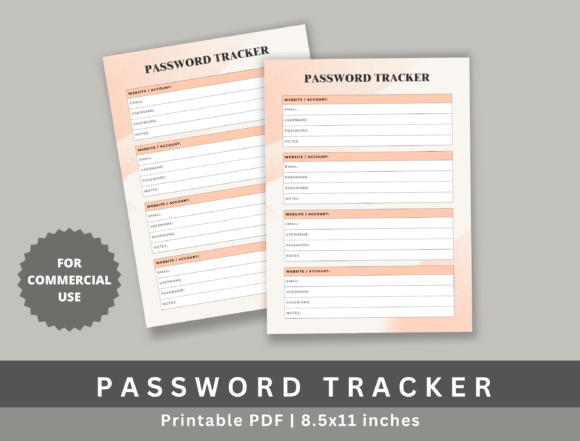
What makes this specific Password Tracker stand out? It’s all in the structure. Designed to the standard 8.5 x 11 inches KDP size, the layout offers generous space for entries without feeling cramped. The design language is intentional and user-friendly.
- Clean Typography and Hierarchy: The headers and rows are designed for quick scanning. You won’t squint or misread a character. Each section is clearly delineated, reducing the cognitive load when you are in a hurry.
- High-Resolution Finish: Every line is crisp and print-ready. Whether you are printing at home or going through Amazon KDP, the result is polished and professional. This high-quality standard ensures your final book looks like a premium product.
- Consistent Formatting: Each page follows a logical flow—Website, Username/Email, Password, and Notes. This consistency trains your eye to find information instantly. The personality of this template is one of efficiency and clarity. It doesn’t scream for attention; it quietly organizes your digital life.
This universal appeal makes it an ideal fit for professional planners, personal journals, and even corporate giveaways. The uncluttered aesthetic speaks to anyone who values order, from a tech-savvy entrepreneur to a retiree organizing their online accounts.
For Personal Journaling and Daily Planners
Integrating a password tracker into a personal journal or planner is a game-changer. You can keep everything from Wi-Fi codes to banking logins in one secure, bound volume. The 120 pages provide enough capacity for years of entries, making it a long-term companion rather than a temporary fix. It also pairs beautifully with event planners, allowing you to keep vendor portals and venue logins easily accessible.
For Small Business and Entrepreneurial Ventures
If you wear multiple hats—marketer, publisher, accountant—you know how many logins that requires. This tracker is designed to handle the load. Use it to manage your email marketing software, e-commerce backend, design asset libraries, and social media accounts. The professional layout reflects the seriousness with which you handle your business credentials. It helps you move from "Where did I save that password?" to a state of organized control.
For KDP Publishers and Content Creators
Here’s where it gets particularly interesting. This Password Tracker isn't just a tool for you to use; it’s a perfect product to publish. In the world of low-content publishing, finding a reliable, high-demand interior that requires no tinkering is gold. This template comes print-ready. You can upload it to KDP immediately. The commercial use allowance means you can build a product around this system and sell it to your own audience, helping them solve their password chaos while building a reliable asset in your own catalog.
Practical Guidance on Evaluating Your Tracker
Not all password trackers are created equal. When choosing one—whether for personal use or for publishing—pay attention to the details that drive user experience.
- Check the Structure: Does it have clear columns for Website, Username, Password, and Notes? A good tracker minimizes confusion and maximizes efficiency.
- Evaluate the Space: Is there enough writing room? The 8.5 x 11 inch size of this template ensures you aren't cramping your handwriting. Space is a luxury in design, and here it is used generously.
- Consider the Aesthetics: If you are publishing, style matters. Clean, minimalist design appeals to a broad audience. It should look just as good in a corporate office as it does on a creative’s desk.
- Review the Licensing: Can you use it commercially? This template explicitly allows commercial use, making it a safe and smart investment for your publishing business. You avoid legal headaches and gain a valuable asset.
By focusing on these elements, you ensure the tracker is not just a list of lines, but a genuinely helpful tool that users will appreciate and rely on. When designing your KDP cover, consider themes that communicate security and order—abstract padlocks, digital grids, or minimalist geometric patterns align perfectly with the interior's professional tone.
The Real-World Value of Organized Credentials
The ultimate goal of any Password Tracker is to reduce friction. When you know exactly where your credentials are, you spend less time clicking "Forgot Password" and more time doing the work that matters. For designers, that means quicker access to tools like Figma or Adobe. For marketers, it means instant entry into your analytics dashboards. For publishers, it means fast uploads to KDP.
This tracker actively supports strong password habits. Instead of reusing the same simple password everywhere, you can generate complex, unique passwords for each site and safely store them here. It encourages a proactive approach to digital security. Over time, this habit builds a robust, personal security infrastructure that pays for itself in time saved and stress avoided. For KDP publishers, providing this tool positions you as a problem-solver, building trust with your audience.
A Must-Have for Low-Content Publishers
If you are in the KDP space, you understand the value of a solid interior. The Password Tracker KDP template delivers on every front. It is 120 pages of high-demand content. It requires zero editing. The resolution is top-notch for both print and digital previews. More importantly, it solves a universal problem. Everyone with an online presence needs a system like this. By packaging it professionally and releasing it under a commercial license, you provide immense value to your customers. They get the organization they desperately need, and you get a reliable, sellable product.
Building Better Organization Systems
Whether you are a busy entrepreneur, a creative professional, or a dedicated KDP publisher, the tools you use shape your daily efficiency. The Password Tracker, KDP template is more than just a list of lines; it is a system designed for clarity, security, and peace of mind. Its clean design, substantial page count, and commercial-ready format make it a standout choice in a crowded market. Take the chaos out of your digital life. A structured approach to your credentials isn't just about remembering passwords—it's about respecting your own time and protecting your digital identity. With this print-ready template, you are just a few clicks away from a more organized and secure routine.